Analyzing Data from After Game Launch
When QA, soft launch, and CBT data mix with official service metrics, it becomes hard to see real user counts and revenue accurately. In Hive Analytics' Time Settings, registering a launch date for each project — down to the minute — excludes any events before that point from metric aggregation. This standard applies not only to new charts, funnels, and retention analyses but also to dashboards you're already using, so registering it before launch lets you measure performance against official service data only from then on.
Game Metrics Mixed with Pre-Launch Data
Before a game officially launches, various events occur through QA, internal checks, soft launches, and CBTs. If this data is aggregated together with post-launch data, it becomes difficult to distinguish real service performance — such as user counts and revenue — from the rest.
Because the scope of pre-launch data varies by game, simply adjusting the query period isn't enough to consistently separate real service data. Rather than manually aligning the start point for each game every time you analyze, you need to manage the baseline from which metrics are aggregated.
Operational Data to Check Based on the Launch Date
When reviewing the performance of projects with different launch dates, you need to check each one from its own service start point onward. Applying a launch date per project lets you focus on each game's actual operating-period users and revenue flow, even within the same query period.
On launch day itself, internal checks run right up until opening can occur on the same date as real user activity. Setting the launch date down to the minute lets you exclude the pre-check window and view operational metrics only from the official opening onward.
Time Settings in Hive Analytics
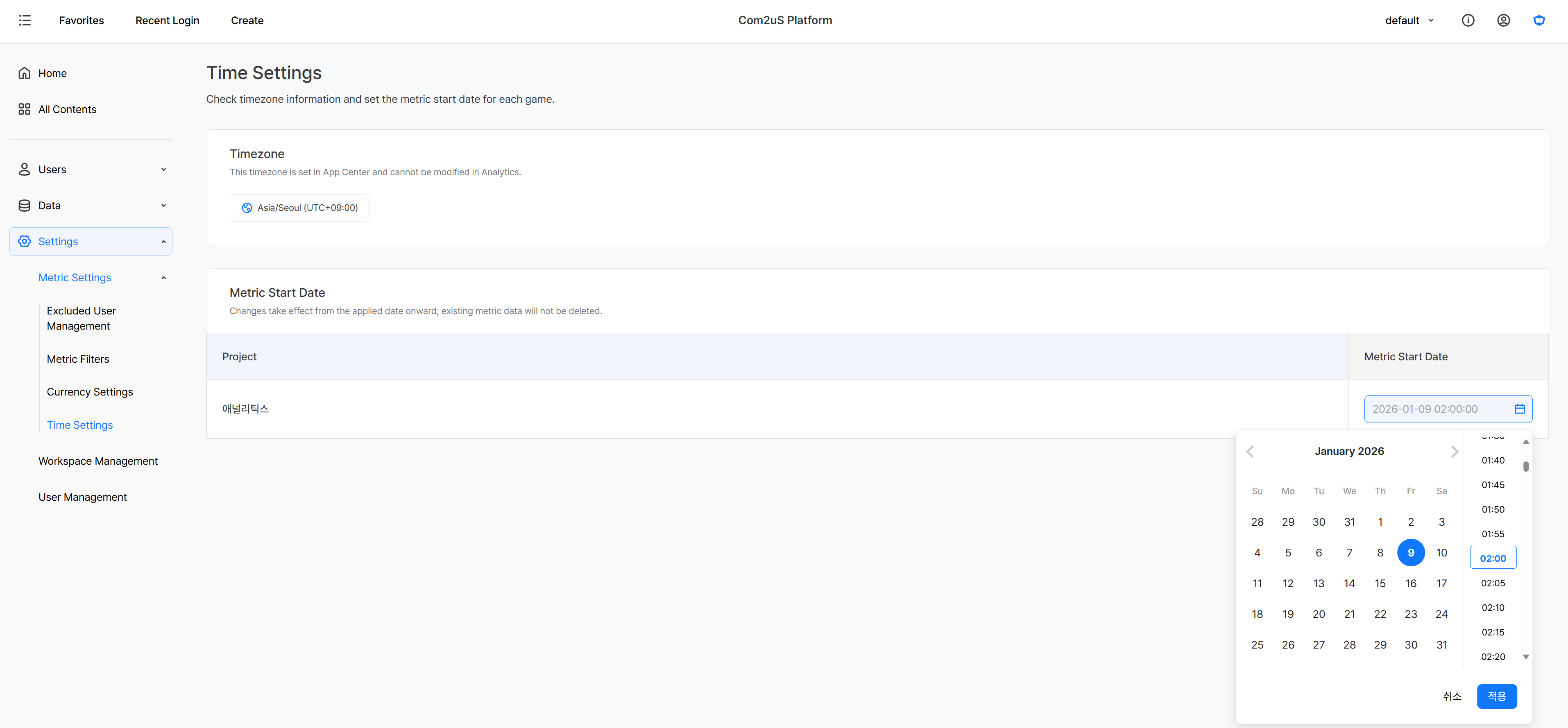
In Hive Analytics' Time Settings, you can register the official launch date for each project. Events that occurred before the set launch date are excluded from metric aggregation.
The launch date can be set down to the minute, so you can separate pre-check data from real service data on launch day. Existing event data isn't deleted — figures are reflected in metrics starting from the launch date you set. It applies to new charts, funnels, and retention, and is also applied at once to dashboards already in use. Since changing the standard afterward can change existing figures, it's best to register it before the game launches.
Checking Game Performance from the Launch Point
Let's look at examples of how a launch date setting is actually applied on screen.
Looking at Games with Different Launch Dates
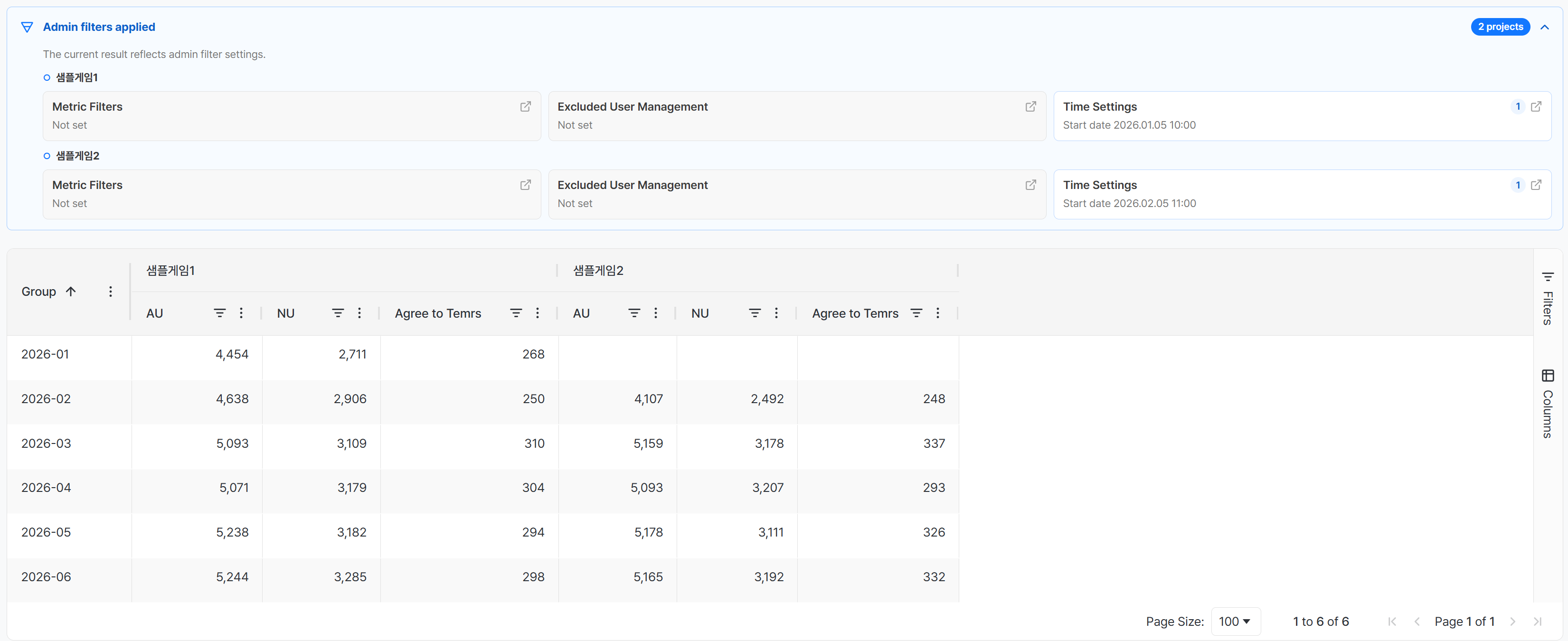
If you run multiple games, you can set a launch date for each project. Registering a different standard for each game excludes events before launch from that project's metric aggregation.
In the example screen, different start points were applied to Sample Game 1 and Sample Game 2. As a result, Sample Game 1 shows monthly metrics such as Active Users (AU) and New Users (NU) starting from January 2026, and Sample Game 2 from February 2026 — letting you check each game's data from its own official service start.
Checking Hourly Metrics on Launch Day
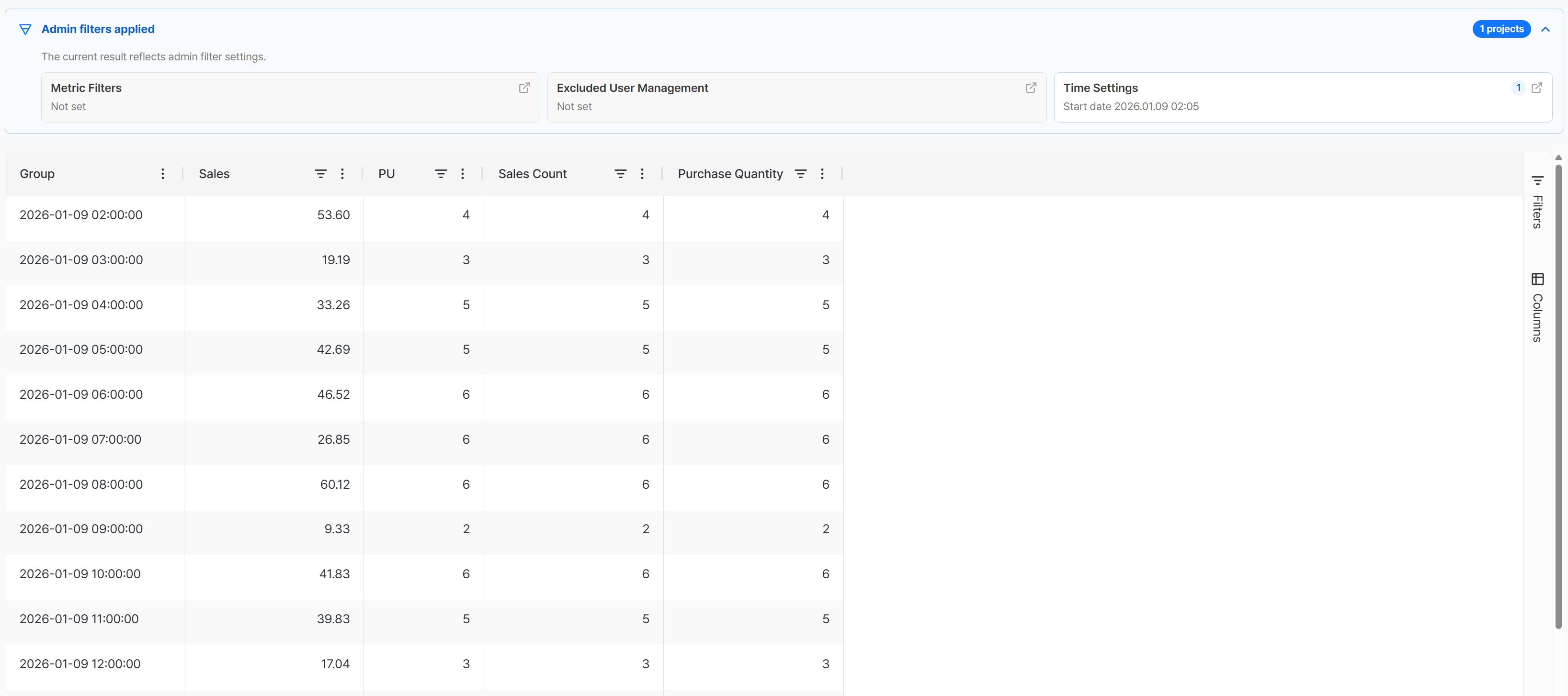
On launch day, setting the launch date down to the minute lets you exclude pre-opening activity from metric aggregation. Organizing post-launch data by hour lets you follow, in order, how the day's revenue, paying users, purchase count, and purchase quantity change.
In the example screen, the launch date is set to 2:05 AM on January 9, 2026, and purchase metrics are then checked by the hour. The 2 AM block shown in the hourly view doesn't start at 2:00 — it only reflects data from 2:05 AM, the set launch date, onward.
Getting Started with Hive Analytics
Go to Settings > Metric Settings > Time Settings to register each game's official launch date. The registered launch date applies equally to charts, funnels, retention, and existing dashboards, letting you analyze post-launch data on a consistent standard. To keep a stable metric standard, it's best to register the launch date before the game launches.
Hive Analytics is a game-focused analytics solution that aggregates data collected through the Hive SDK by each game's launch date, and lets you analyze it in charts, funnels, retention, and dashboards. Explore your post-launch game performance on a consistent standard with Hive Analytics now.