Defining Your Log Collection Structure with Event Templates: Sending Event Logs, Part 1
Hive Analytics provides event templates for player actions commonly needed in game analysis. Event names and properties are predefined in each template, so you can define your log collection structure without designing events from scratch. Analysts select an event in Data > Event to see the metrics it supports, edit or add predefined properties in Property Setting, and then check the source code for their development environment in Source Generation. Before requesting development, send test logs to verify that the data is collected in the intended structure.
Why Game Event Logs Need Consistent Definitions
To analyze player behavior accurately, event names and properties must be defined by consistent criteria. Games analyze a wide range of player actions, not only logins and purchases but also content completion, currency acquisition, and item use. Analyzing these actions requires collecting information about the moment each action occurs as event logs, which means defining the event name, when it fires, and the properties and data types sent with it in advance.
If each game designs these items from scratch, actions with the same meaning can be collected under different names or structures. To clearly understand what each log means and to compare data from multiple games on the same basis, consistency has to start with event definitions.
What Are Event Templates in Hive Analytics?
Event templates in Hive Analytics provide actions commonly needed in game analysis with their event names and properties predefined. Before looking at event templates, here are the key terms used in log collection.
| Term | Description |
|---|---|
| Event | A unit of data recording a specific action a player performed in the game. It captures when, who, and what. |
| Property | Detailed information recorded along with an event, showing under what conditions and with what values the action occurred. |
| Source code | Code automatically generated for each development environment in the Source Generation tab to send the event to Hive Analytics. |
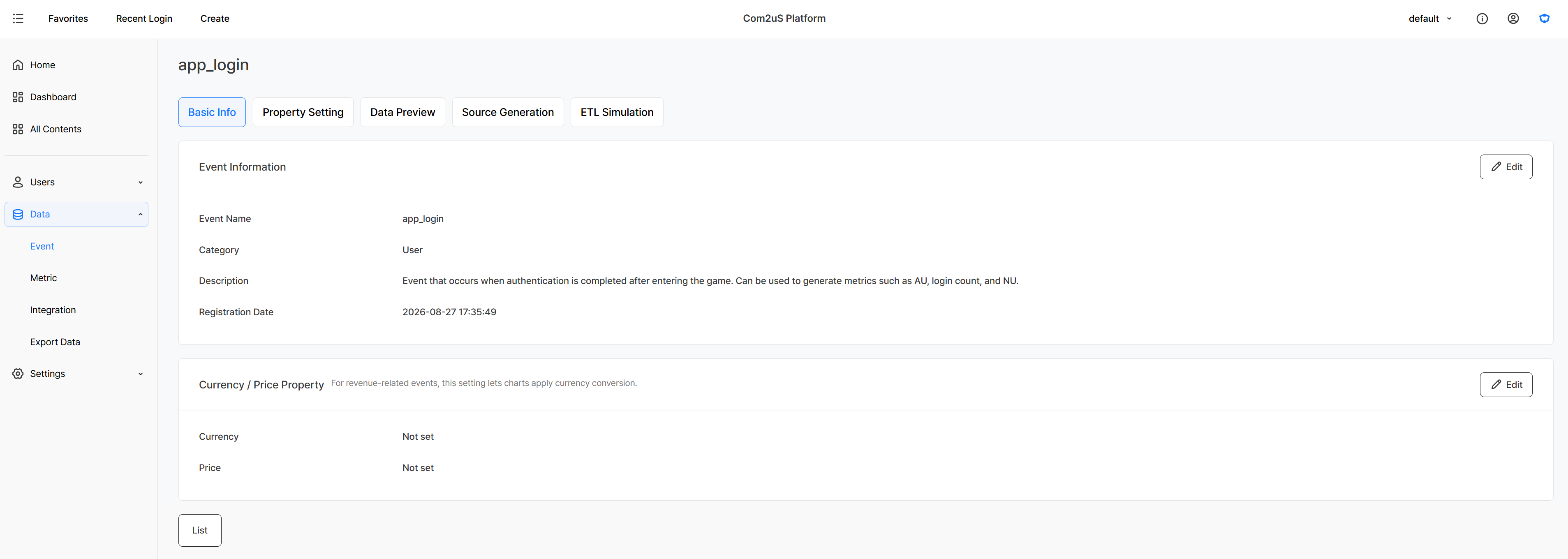
app_login event is sent in the Basic Info tab, its properties in Property Setting, and its source code in Source Generation.Event templates also include events such as login and purchase that are collected automatically when you integrate the Hive SDK. Events included in the templates have their names and properties predefined in Data > Event, so you can use them without designing the structure from scratch, and you can start event-based analysis in Hive Analytics as soon as the logs are sent. Logs sent without registering the events or properties in advance can also be used in Hive Analytics.
Checking Event Templates on the Developer Site
Even without signing in to Hive Analytics, you can check each predefined event's send timing, example metrics, whether the Hive SDK collects it automatically, and its property list in the event template guide on the Hive Developers site.
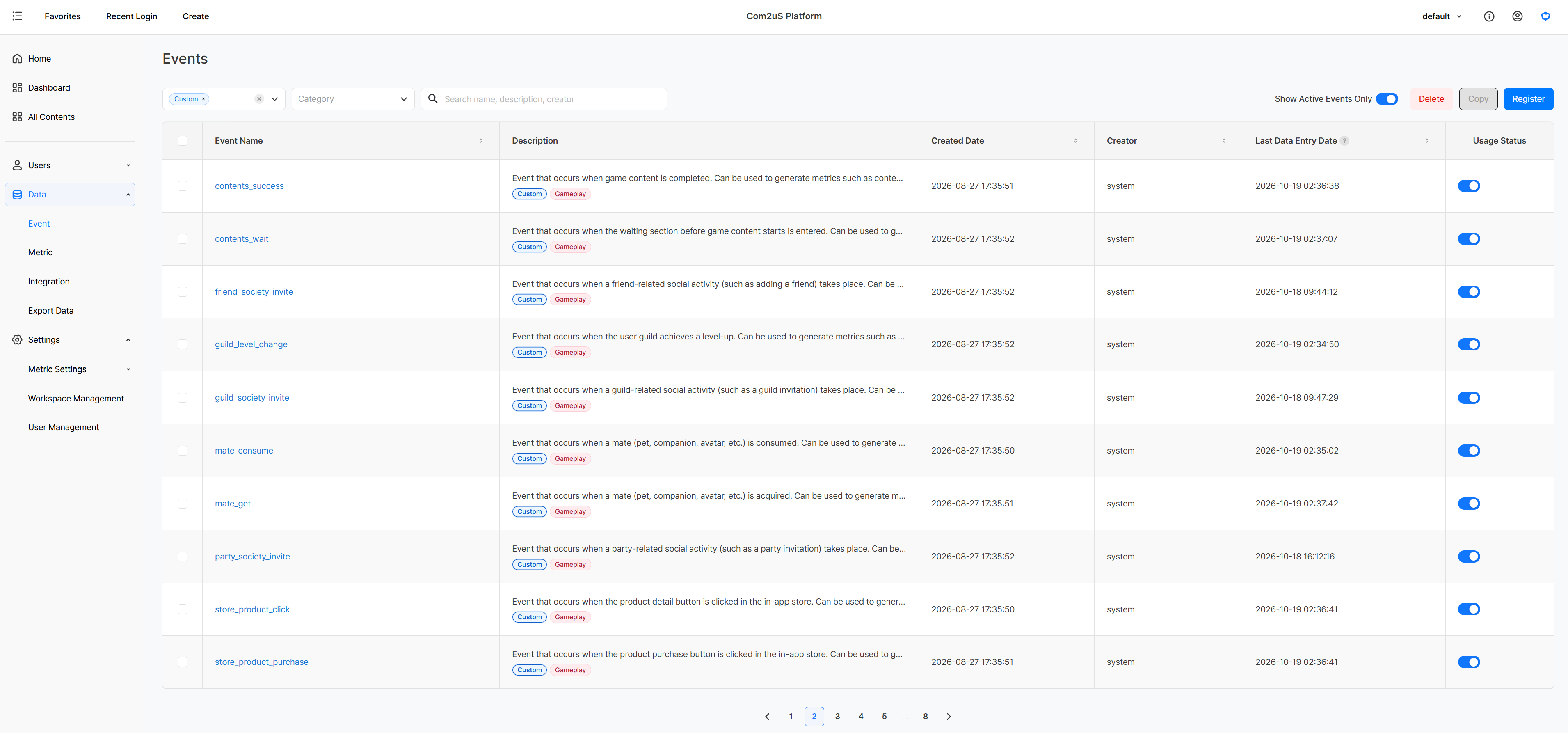
Selecting an event shows the metrics you can build with it. In Property Setting, review the predefined items and edit them or add new properties to fit your analysis. After configuring the properties, select your game's development environment in Source Generation to see source code that reflects the events and properties you set.
Before applying the generated source code to actual development, send test logs to verify that events and property values are collected in the intended structure and that the data can produce the metrics you need. Reflecting the results lets you finalize the event structure and source code to hand over to developers.
Analysts select the event that matches the action to analyze and prepare the necessary properties and log-sending source code in the following order.
- Select an event
Find the event template that matches the action you want to analyze. - Configure properties
Review the predefined properties and edit or add the ones you need. - Generate source code
Select your game's development environment to generate source code that includes the events and properties you set.
Preparing a Content Completion Event with contents_success
To analyze the number of players who completed content and their average play time, you need to prepare the contents_success event and the source code that sends its logs. The process from event selection to source generation is as follows.
Select an event
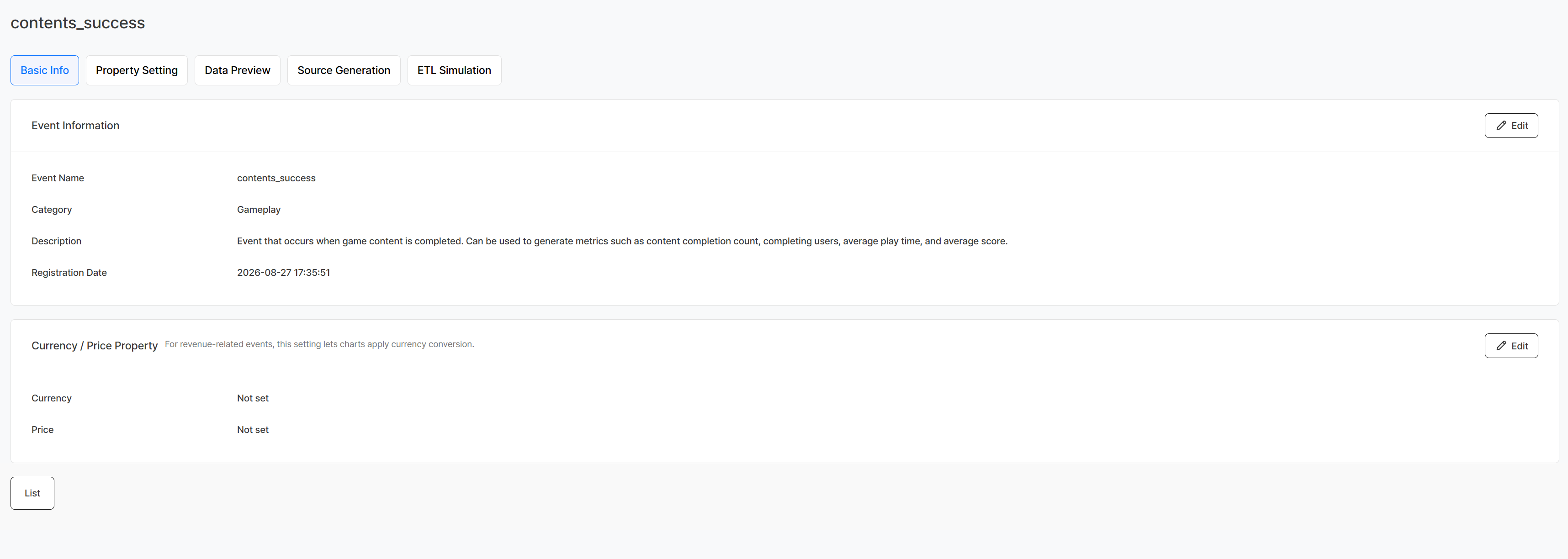
Select contents_success in Data > Event and check its description. contents_success is an event that fires when a player completes game content, and it can be used to build metrics such as content completion count, completing players, average play time, and average score. Based on this information, analysts decide which metrics to use and specify when the event should fire in the game.
contents_success.Configure properties
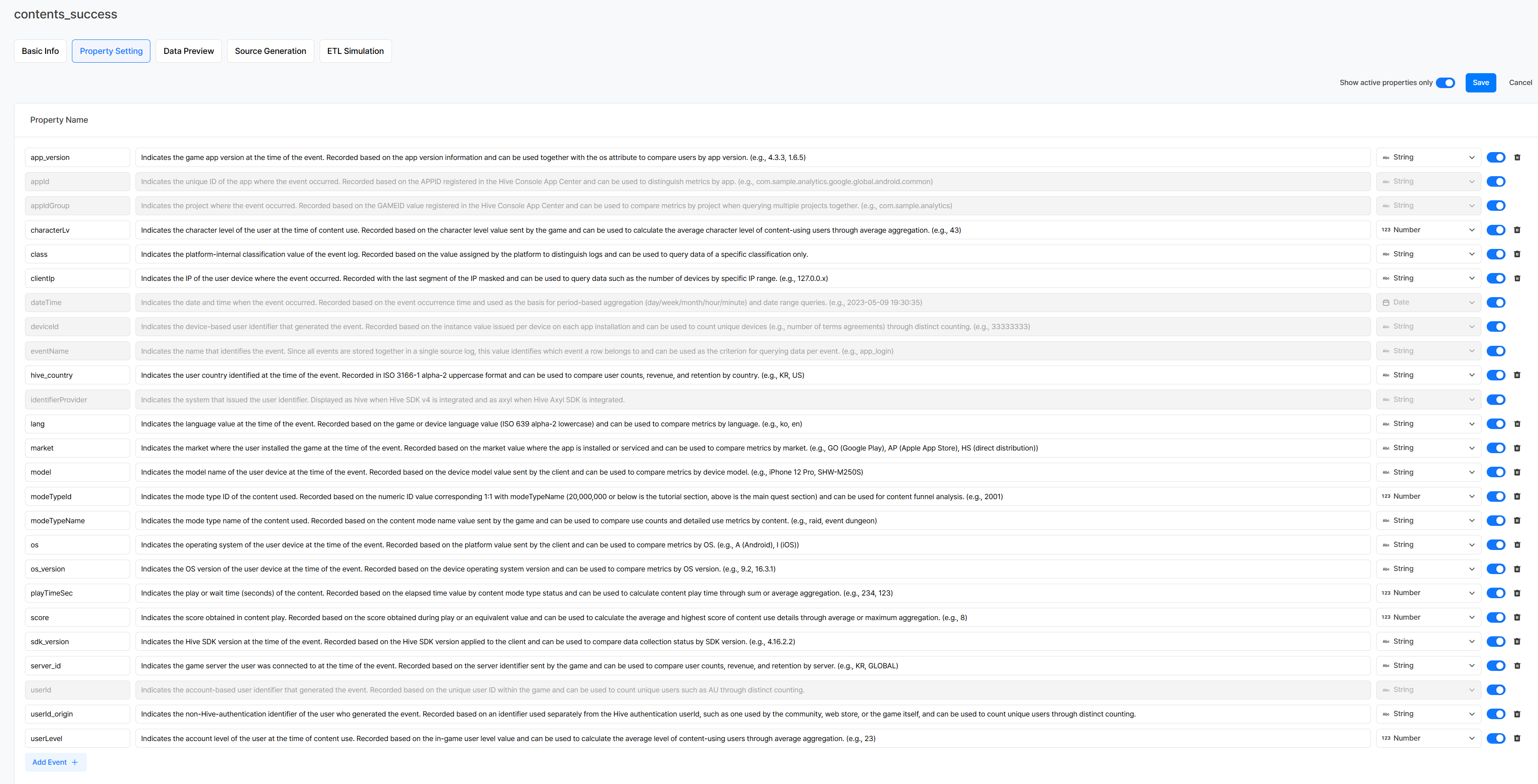
In Property Setting, check the properties predefined for contents_success, along with each property's description and data type. Properties are later used to set up measures, dimensions, and filter conditions when you build charts in Create. contents_success includes market and hive_country for the player's environment, userId and deviceId to identify the player, and characterLv and modeTypeId for the details of the content completion.
appId, appIdGroup, dateTime, userId, deviceId, eventName, eventTime, and identifierProvider are common properties managed by the system and cannot be edited in Property Setting. Among them, userId, deviceId, identifierProvider, eventTime, eventName, and appId or appIdGroup are required properties that must be included when sending event logs. dateTime is the time stored after converting the sent eventTime to UTC.
Predefined properties can be edited as needed. If a value you need for analysis is missing, click Add Event + at the bottom left of the edit screen to add a new property. For example, to use character names in your analysis, add a characterName property and set its data type to string. Even properties not predefined in Hive Analytics can be used for analysis if you include them in the logs you send. Events and properties saved this way can serve as the same collection standard across multiple projects, so the same action is sent with consistent property names, data types, value formats, and units.
Generate source code
After configuring the properties, choose client or server development in Source Generation and specify the development environment your game actually uses. The generated source code includes the event name and properties you set, so analysts check that everything needed for implementation is reflected correctly.
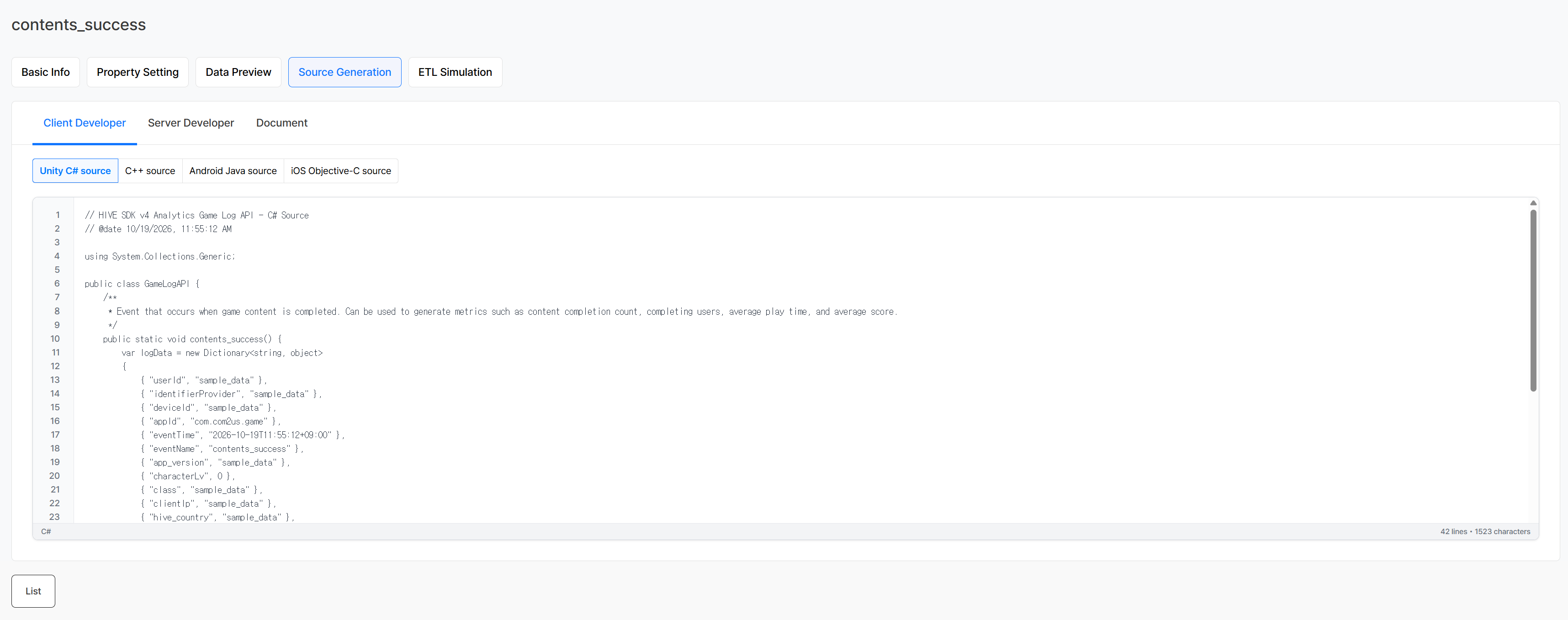
You can hand the generated source code to developers to implement the actual log-sending feature. Before requesting development, you can send test logs to verify in advance that events and properties are collected in the intended structure and that the data can produce the metrics you need. How to validate with test logs is covered in detail in "Validating Your Collection Structure and Metrics with Test Logs: Sending Event Logs, Part 2."
Getting Started with Hive Analytics
With event templates, analysts can configure the events and properties they need themselves and prepare log-sending standards in the form of source code for their development environment.
Hive Analytics is an analytics solution built for games that analyzes player behavior and game metrics based on game events collected through the Hive SDK. Check the event templates that match the game actions you want to analyze in Hive Analytics today, and prepare the properties and source code you need.