Checking the Event Log Storage Structure and Failed Data: Sending Event Logs, Part 4
Among the events sent to Hive Analytics, events that meet the collection criteria are stored in t_raw_event_log in your company's BigQuery dataset, and events that do not are stored in t_raw_event_log_rescue together with the raw JSON and the quarantine reason. If you cannot find an event in the normal table, check the quarantine reason with errorReason, errorStackTrace, and rawData in the rescue table. For example, if eventTime does not follow the RFC 3339 format, the event is quarantined with error 201 (DATETIME_INVALID). In that case, correct the time format, send the event again, and check that it is stored in the normal table.
Checking Where Sent Events Are Stored
"Sending Game Data as Event Logs: Sending Event Logs, Part 3" covered how to send actual game data as event logs. This part looks at how sent events are stored, and covers the reasons events are quarantined when they are not stored normally and how to check them.
After applying the log-sending code, check that events are stored normally. Events that meet the collection criteria, such as required properties and value formats, are stored in the normal table, while events that do not are stored in a separate quarantine table.
If you cannot find a sent event in the normal table, do not simply assume a collection delay. Check whether the event was quarantined and why.
How Hive Analytics Stores Events
Event Data
Events collected normally by Hive Analytics are stored in the t_raw_event_log table in your company's BigQuery dataset. This table is partitioned by day based on dateTime and stores the basic information and properties of each event together.
| Field | Data type | Description | How it is generated |
|---|---|---|---|
userId | STRING | Account-based player identifier | Sent as a required property |
identifierProvider | STRING | System that issues the player identifier | Sent as a required property |
deviceId | STRING | Device-based player identifier | Sent as a required property |
appId | STRING | ID that identifies the app where the event occurred | Sent as a required property |
appIdGroup | STRING | ID that groups multiple apps into one game (project) | Generated automatically from appId |
dateTime | TIMESTAMP | Time the event occurred, converted from eventTime to UTC | Generated automatically by parsing eventTime |
eventName | STRING | Name that identifies the event | Sent as a required property |
checksum | STRING | Hash value generated from the event data | Generated automatically from the event data |
bigqueryRegistTimestamp | TIMESTAMP | Time the event was stored in BigQuery | Generated automatically on storage |
attributes | JSON | Area where custom properties and automatically collected properties are stored | Generated automatically by structuring the sent properties |
When the contents_success event is collected normally, the basic information and property values of the event are stored in a single row, as shown below. If the same event is sent again, duplicate data may be stored. When querying raw data directly, we recommend removing duplicates based on checksum.

t_raw_event_log.How Event Properties Are Stored
Properties sent with an event or collected automatically are stored as JSON in the attributes field. Inside attributes, properties are divided into hiveAttributes and eventAttributes depending on how they are collected.
| Area | Description | Main values |
|---|---|---|
hiveAttributes | Properties added automatically while Hive Analytics processes the data | _dataSource |
eventAttributes | Properties sent with the event or collected automatically by the client | Original eventTime, custom properties, properties collected automatically by the SDK |
The _dataSource value in hiveAttributes shows the path the event was sent through, such as the Hive SDK or a game server. In eventAttributes, you can check the custom properties sent directly by the game and their actual values. Client properties collected automatically through the Hive SDK are also included in this area. For details, see Event storage structure on the Hive Developers site.
Quarantined Data
Events that do not meet the collection criteria, such as required properties and value formats, fail to load and are quarantined in t_raw_event_log_rescue in your company's BigQuery dataset. The quarantine table stores the raw JSON that was sent together with the quarantine reason. If an event does not appear in the normal table, check whether it was quarantined in the rescue table.
| Main quarantine reason | Description |
|---|---|
| Missing required property | A property required for sending logs is missing or empty |
| Reserved word used | attributes, eventAttributes, or hiveAttributes is used as a custom property name, or a property name starts with _ |
| Unsupported data type | A JSON object or array is sent as a custom property value |
Invalid eventTime format | eventTime cannot be interpreted in RFC 3339 format including the time zone |
eventTime out of the allowed range | The event time is outside the range that can be collected (10 years in the past to 5 years in the future) |
| JSON format error | The sent log cannot be interpreted as valid JSON |
Reserved words used in property names are not case-sensitive. For example, Attributes and HIVEATTRIBUTES are also treated as reserved words, so do not use them as custom property names.
How the Quarantine Table Is Structured
t_raw_event_log_rescue stores the basic event information that can be read from the raw log, the raw data, and the cause of the quarantine.
| Field | Data type | Description |
|---|---|---|
userId | STRING | Player identifier read from the raw log |
identifierProvider | STRING | System that issues the player identifier |
deviceId | STRING | Device identifier read from the raw log |
appIdGroup | STRING | ID of the game (project) the event belongs to |
dateTime | STRING | Original eventTime value that was sent |
eventName | STRING | Name that identifies the event |
bigqueryRegistTimestamp | TIMESTAMP | Time the event was stored in BigQuery |
checksum | STRING | Hash value generated from the event data |
rawData | STRING | Raw JSON of the sent event |
errorReason | STRING | Code that indicates why the event was quarantined |
errorStackTrace | STRING | Details about the cause of the quarantine, such as a missing field |
In the normal table, dateTime stores a TIMESTAMP value converted from eventTime. In the quarantine table, dateTime stores the original eventTime as a string so that you can see what was wrong with the sent value.
Checking Why contents_success Was Quarantined
This section walks through checking quarantined data in BigQuery after sending the contents_success event.
Requesting BigQuery Query Access
To check quarantine reasons, you need access to query raw data in BigQuery. To use BigQuery, obtain Hive Analytics administrator permission and then request BigQuery query access from the account menu in Hive Analytics. Once access is granted, open the BigQuery console in Google Cloud and find the Hive Analytics project and your company's dataset that you were granted access to in the Explorer. Then queryt_raw_event_log_rescuein that dataset. For details on using BigQuery, see BigQuery Setup on the Hive Developers site.
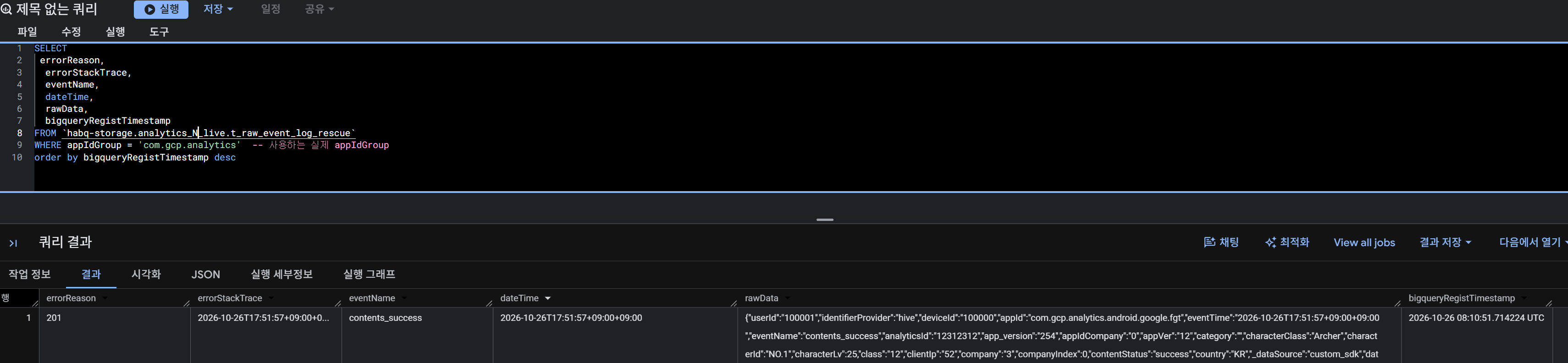
Querying t_raw_event_log_rescue in BigQuery showed 201 in errorReason. Checking errorStackTrace and rawData shows that eventTime was sent as 2026-10-26T17:51:57+09:00+09:00, with the time zone duplicated. This value does not match the RFC 3339 format, so it cannot be parsed into dateTime for storage.
Quarantine Codes and Actions
| errorReason | Action |
|---|---|
| 100 | The sent message is not valid JSON. Validate the JSON format before sending. |
| 200 | Send the eventTime field in RFC 3339 format including the time zone. Also make sure the eventTime value falls within the allowed range (10 years in the past to 5 years in the future). |
| 201 | Send the eventTime field in RFC 3339 format including the time zone. |
| 300 | attributes, eventAttributes, and hiveAttributes are reserved fields generated automatically by the pipeline, so do not include them in the event directly. Field names that start with _ are reserved for internal pipeline use, so do not use them. |
| 400 | Check that all required fields (userId, identifierProvider, deviceId, appId, eventName, eventTime) are included before sending. |
| 401 | An event property value contains a JSON object ({}) or array ([]). Send all properties as a flat, single-level structure (strings or numbers). JSON strings ("{...}", "[...]") are also rejected. |
After checking the correct format and allowed range of eventTime, correct the value so that it includes the time zone only once, as in 2026-10-26T17:51:57+09:00, and send it again. Then query the data with the same conditions to check that the corrected event is stored normally in t_raw_event_log.
Getting Started with Hive Analytics
Events collected normally are stored in t_raw_event_log, and events that do not meet the collection criteria are quarantined in t_raw_event_log_rescue together with the raw data and error information. By checking both tables together, you can tell how each event was stored, find the cause of logs that were not collected normally, and fix your sending code.
Hive Analytics is an analytics solution built for games that lets you analyze collected game events and identify the cause of problems by checking the quarantine reasons and raw data of event logs that were not processed normally. Check the sending status of your events in the BigQuery dataset of Hive Analytics today.